
February 28th, 2006 by Jamie Estep
Convert an Omni 3740 or 3750 for Ethernet Processing
Filed in: Credit Card Equipment, Guides | 18 comments
The Verifone Omni 3740 and 3750 credit card terminals are compatible with an Ethernet processing module, which will enable them to process over an IP based connection. The Ethernet module is available in an Ethernet only, and a dual comm version, which includes a phone connection and the Ethernet connection. I highly recommend the dual comm version of the module over the Ethernet only module.
The Ethernet processing module is a small electronic adapter that replaces the land-line module that comes standard with Omni credit card machines.
This is a simple instruction on how to convert your Omni to the Ethernet compatible version.
What you will need:
Compatible IP enabled processing service
Small Philip’s Screw Driver
Omni 3740 or 3750
Omni Ethernet or Dual Comm Module
An IP based connection for processing (broadband internet, VOIP, LAN, etc.)
First make sure the terminal is completely unplugged, and make sure you do not have any transactions on the terminal. If you have transactions that are not batched sitting on your terminal, you will probably lose them. Make sure you are batched out.
- The processing module in your machine is located on the bottom rear of the terminal. It is held in place by a single screw which can be removed by a small Philip’s screwdriver.
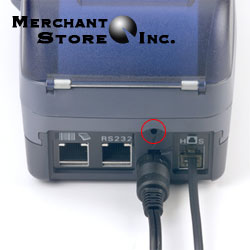
- Once the screw is removed, the module can be slid backwards and removed from the terminal. Be careful not to touch the medal contacts, as this may damage the module.
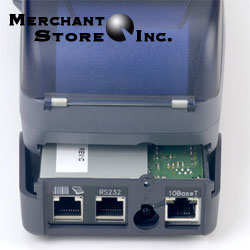
- Once the old module is removed, the new Ethernet or dual comm module can be inserted into the terminal, exactly as the old module was removed. Carefully push the new module into the terminal. Again, make sure you do not touch the metal contacts to avoid damaging the module.
- Once the new module is fully inserted into the terminal, replace the screw that was removed in step 1.
- Your terminal will now need to be re-programmed in order to operate. You will need to call your provider and they can normally do this over the phone. Hopefully everything will work smoothly the first time and you should now be able to process over an IP based connection.
Disclaimer: This guide was written as I swapped out a module in an Omni 3750, so it is accurate to the best of my writing ability. Regardless of that fact, this guide is meant as a reference only. I make no guarantee of the accuracy of this guide, and I am not responsible in any way for anyone messing up their terminal as a result of following this. Credit card terminals are complex and expensive equipment, so if you are unsure of your own ability to perform the swap, I suggest you get help from a qualified individual or your processing company.


Great post, but where can I find a Dual Comm Module? My credit card processor hasn’t heard of it, and I can’t find a source for one online. Any suggestions?
Thanks,
Bonnie
We offer them here: Omni Dual Comm Module
and you can probably find one on eBay pretty easily. Search for ‘Verifone Omni Ethernet’.
I want to make sure I understand. On the dual comm unit, the RS232 port is what the phone connection will use?
Thank you.
Gary
Gary,
On the dual comm module, there is a traditional phone jack on the very bottom of the module.
I’ll take a picture and post it up here.
If the module doesn’t have the plug on the bottom it is the ethernet module and not the dual comm module. The problem with the ethernet only module is that only a few companies can program an omni over an IP connection. They are normally programmed on the land-line and then switched to the IP connection. It is also possible to program them with a dial module and swap them out after the terminal is programmed for IP operation. Not an easy task, but I have seen it done a few times.
It should be noted that doing this COULD void your warranty.
One thing I keep seeing is that one needs a 4 meg model of the 3750 in order for this additional hardware to work. Do you know of a way to test for this? I haven’t been able to see anything in my menus or at power-on.
I have the same basic question as Anders…will this dual-comm module work with any 3750?
I own a Omni 3200 and I need it to work with a VOIP line.
Is their a way to change out the module for this to work?
call 215-669-3020 or email back!
Thanks
I have now answered at least part of my question. Within the setup modes, there is a “Unit Report” that will show you some info about what is installed. Mine showed “Ram 2048” and “Flash 2048”. I have installed the ethernet/phone hardware replacement module and it is currently working. So if you have that much or more, it will work. If you have less, I have no idea what would happen.
Be sure before you download new software that you erase all the flash, as it may have space to download the new code without errors, but then not enough to process/unpack the new code.
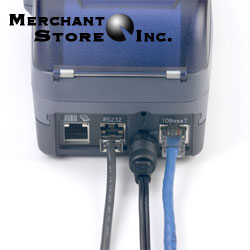
Also, a note: although you can’t see it in the above pictures, on the bottom of the unit is a jack for a standard phone line, which the unit will use as a backup.
Will this conversion handle the datacomm for an attached check reader? The check reader is connected to the RS232 port and has it’s own phone line.
Hey Bonnie-
We have the dual com module for sale go to http://www.merchantservicescomplete.com/catalog/index.php
do you know if the verifone omni3750 could be used with the new magicjack rather than a landline my business is in a rural town in AZ and I have one phone company to choose from that is absolutly outragously priced hence the magicjack I use and I was hoping that I could hook it up thru that instead of having to use the rediculously priced telephone company. or I have been reading some of the other comments about possibly hooking it up to go thru your computer. i need advice please help Thank you
i have seen the following problem on a couple of 3750’s and wonder if anyone else has seen it and found a fix for it. we have converted several 3750’s from dial to dual comm and they work great. then for some reason the terminal stops recognizing the ethernet connection. the dial connection still works. i have tried reloading it but that does not change anything. my only thought is that the power supply is getting weak – i guess i will have to purchase a new supply to verify this theory unless anyone else has any thoughts.
has anyone tried using a verifone (3730,3740 or 3750) dial terminal connected to a Magic Jack? this looks on the surface to be a very cheap way of converting a dial terminal to ip if it works
Bob Said: then for some reason the terminal stops recognizing the ethernet connection.
I’ve seen this. It happens when the IP addresses get reassigned, generally after a power outage. Resetting/rebooting the whole system (routers and card machines) seems to get it back on track.
I switched to dual comm module but my problem is its not running any faster than it did with dial up about 12 seconds. My dsl is running bet 5.0 and 5.8 mbps. I thought it was supposed to run at 2 to 4 seconds? can someone help please?
Can someone please direct me to the cellular (wireless) module for the 3750. Having difficulty finding this Advanced Communications Module. Thx
Are you still offering Verifone Omni Dual Comm Ethernet Module?